
Check first, then change. To enable TPM and Secure Boot on a Windows PC, confirm the current state with tpm.msc and msinfo32, switch on Intel PTT or AMD fTPM in the UEFI firmware, make sure Windows boots in UEFI mode from a GPT disk, and then turn Secure Boot on. Most PCs with an Intel 8th Gen or AMD Ryzen 2000 chip or newer already have the hardware. The one risky step, converting an MBR disk to GPT, is one many readers won’t need.
Who needs TPM 2.0 and Secure Boot now?
Call of Duty players on PC and anyone moving to Windows 11 need both. Activision’s support page says players of Modern Warfare 4 and Warzone who do not meet the requirements “will be restricted from playing any online game mode”. On Black Ops 7 the penalty is lighter: certain modes, including Ranked Play, are locked, and you may be matched in a separate pool.
A Trusted Platform Module (TPM) is a security chip, or a firmware feature built into the processor, that stores keys and can vouch for how the PC started. Secure Boot is a firmware check that, at every start, verifies the signature of each piece of boot software, including the operating system, according to Microsoft’s Secure Boot overview. Together they let the game, or Windows, check that the start-up chain was not tampered with.
| Requirement | What Activision and Microsoft ask for |
|---|---|
| Windows version | Windows 10 version 22H2 or later, or Windows 11 |
| TPM | Version 2.0: Intel PTT, AMD fTPM or a discrete TPM chip |
| Processor for firmware TPM | Intel 8th Gen or newer, or AMD Ryzen 2000 series or newer |
| Boot mode | UEFI, not Legacy (CSM) |
| Disk partition style | GPT, not MBR |
| Secure Boot | On |
| Windows 11 firmware | “UEFI, Secure Boot capable” (Microsoft) |
The Modern Warfare 4 PC requirements page adds that “other security measures may be enforced”, so read this list as today’s minimum.
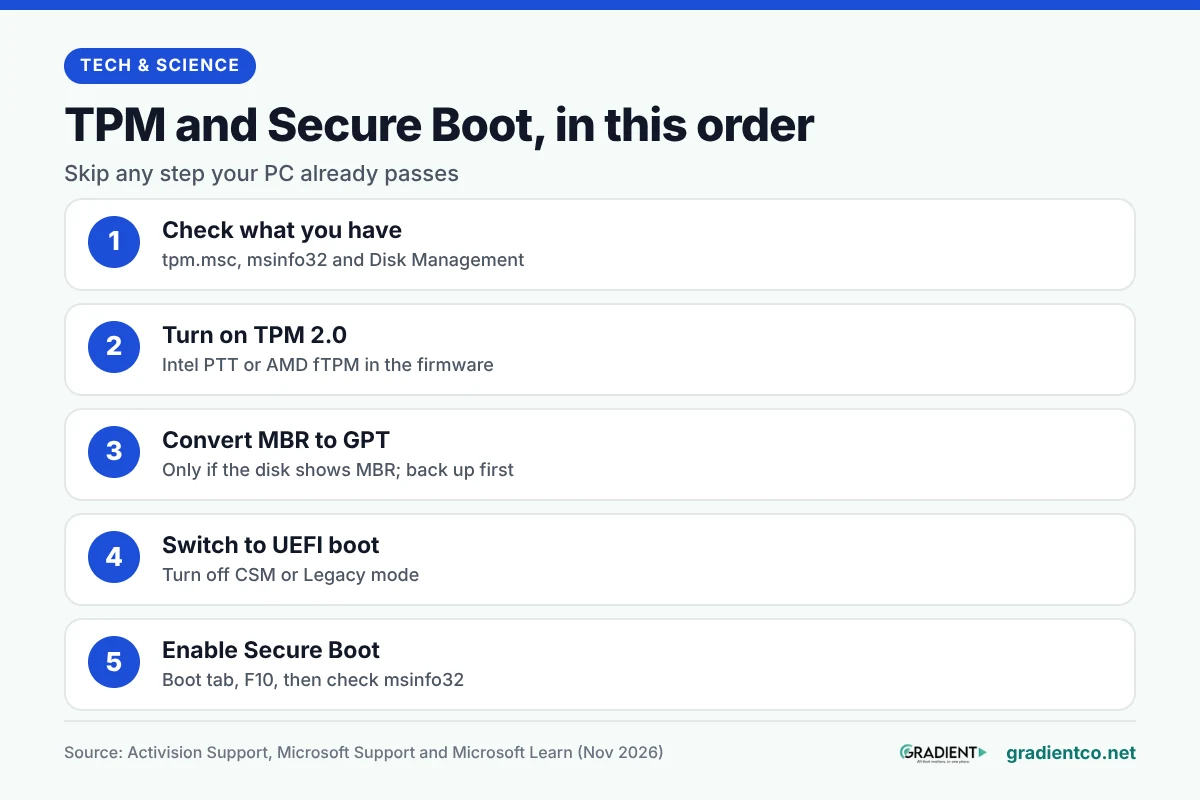
How do you check what your PC already has?
Before you enable TPM and Secure Boot, run three quick checks to see which steps you can skip.
- TPM: press Windows + R, type
tpm.mscand press Enter. “The TPM is ready for use” with a Specification Version of 2.0 means you’re done with TPM. “Compatible TPM cannot be found” may simply mean it is switched off, says Microsoft’s TPM guide. - Boot mode and Secure Boot: press Windows + R and run
msinfo32. Look at “BIOS Mode” (you want UEFI) and “Secure Boot State” (you want On). - Disk style: right-click Start, open Disk Management, right-click the disk that holds Windows (usually Disk 0), choose Properties and open the Volumes tab. “Partition style” shows GPT or MBR.
If BIOS Mode already says UEFI and the disk shows GPT, skip the conversion section below. Activision also offers a Secure Attestation Wizard (version 1.3.0, updated 21 October 2026), which scans your BIOS information to confirm whether the PC meets its security requirements.
How to turn on Intel PTT or AMD fTPM
TPM is a single switch in the firmware, and Microsoft notes that most retail motherboards ship with it turned off. If tpm.msc found nothing, this is likely your fix. Getting into the firmware is the same on every PC running Windows: Settings, then System, then Recovery, then Restart now under Advanced startup. Choose Troubleshoot, Advanced options, UEFI Firmware Settings, and Restart.
Each brand names the switch differently. Look in an Advanced, Security or Trusted Computing menu for:
- Intel PTT, or Intel Platform Trust Technology (Intel processors)
- AMD fTPM switch, or AMD PSP fTPM (AMD processors)
- Security Device Support, or TPM State (common on laptops)
On ASUS boards, for example, the ASUS guide puts Intel PTT under Advanced, PCH-FW Configuration, and the AMD option under Advanced, AMD fTPM configuration, where “TPM Device Selection” is set to “Firmware TPM”. Press F10 to save and restart, then run tpm.msc again.
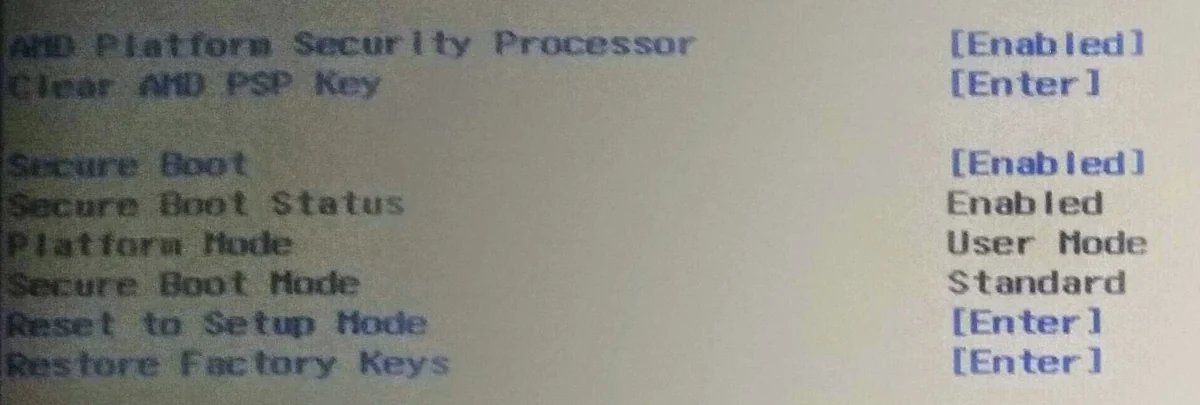
One caution from PC Games Hardware’s troubleshooting list: do not use the “Clear TPM” option to fix an error. Clearing can wipe keys that encrypted data depends on.
Is your disk MBR? How to convert it to GPT safely
If your disk is MBR, Activision’s check fails until it is GPT, and Microsoft’s built-in MBR2GPT tool converts it without deleting your files. According to Microsoft Learn, the tool already sits in Windows\System32. It’s still a one-way change to how the disk starts, and the tool itself warns: “These changes cannot be undone!”
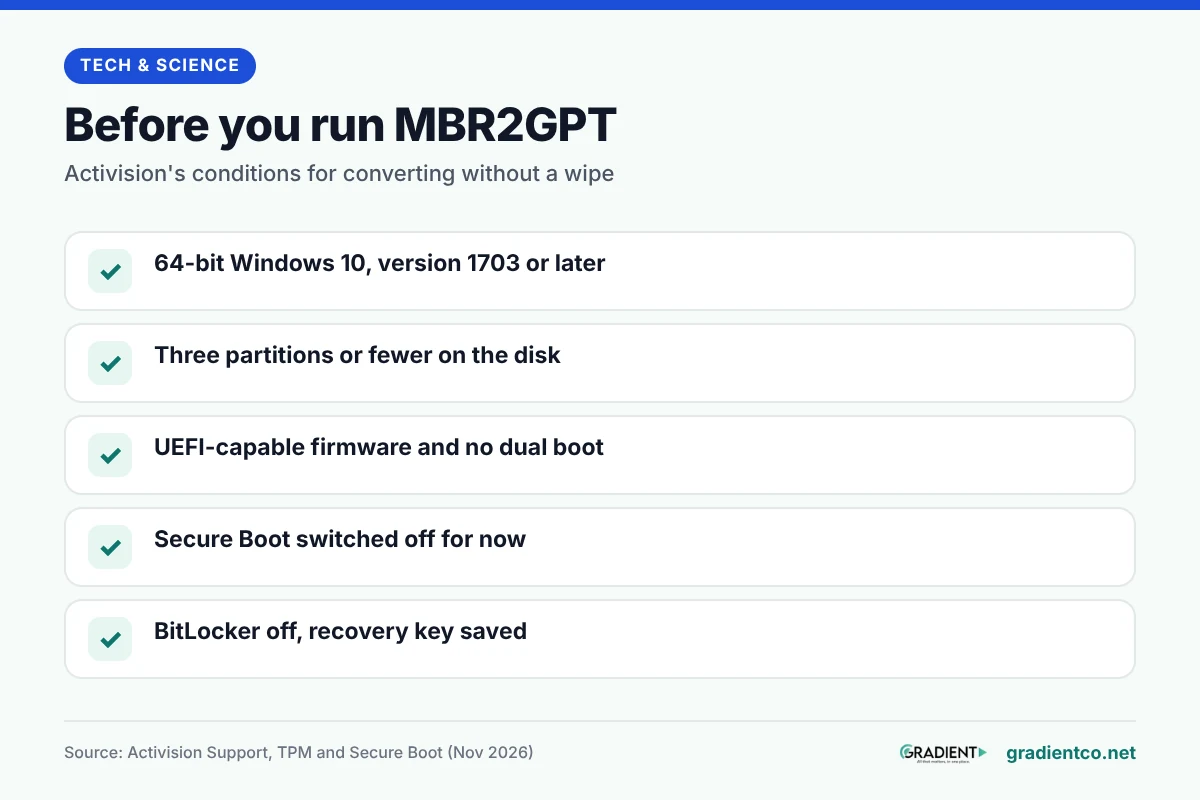
Before you start, meet the conditions Activision lists: 64-bit Windows 10 version 1703 or later, no more than three partitions on the disk, no dual boot, firmware that supports UEFI, and Secure Boot off. Then prepare:
- Back up anything you can’t lose to an external drive or cloud storage.
- Save your BitLocker recovery key if the drive is encrypted. It is a 48-digit number; if it was backed up to your Microsoft account, you can find it at aka.ms/myrecoverykey. Microsoft says its support staff cannot recover a lost one. Then turn BitLocker off, as Activision advises, and turn it back on after the switch.
- Plug the PC into a UPS if power cuts are common where you live. In our view, a power cut halfway through a conversion or firmware update is not a risk worth taking.
Next, open Command Prompt as administrator and run a check that changes nothing: mbr2gpt /validate /allowFullOS. Leaving out /disk: makes the tool pick the system disk, so you can’t convert the wrong drive by mistake.
“Validation completed successfully” means you can go ahead. If it fails, nothing has been touched, and the reason is written to setupact.log and setuperr.log in the Windows folder. When it passes, run the real conversion with mbr2gpt /convert /allowFullOS.
Restart straight into the firmware (on ASUS boards, press Del at the logo; other brands list their key in the manual) and change the boot mode from Legacy or CSM to UEFI. Microsoft is explicit that the firmware must boot in UEFI mode after conversion, or Windows will not start.
How to enable TPM and Secure Boot in the right order
Order matters because each setting depends on the one before it. With TPM on and the disk on GPT, go back into the firmware and work through these:
- If you didn’t already do it after converting, set the boot mode to UEFI only, or switch off CSM (Compatibility Support Module). Microsoft’s Windows 11 and Secure Boot page says to make UEFI “the first or only option”.
- Open the Boot tab (Security on some boards) and set Secure Boot to Enabled.
- Press F10 to save and exit.
- Back in Windows, run
msinfo32andtpm.msconce more. Secure Boot State should now say On.
Activision’s warning is worth taking seriously: changing firmware settings the wrong way “can cause system issues, including boot failures”. If a menu doesn’t match these steps, follow your motherboard or laptop maker’s manual.
What if your PC is too old for firmware TPM?
The processor cutoff in the table above rules out firmware TPM on many older desktops. If you’re buying a used or refurbished PC, check the processor generation before paying. If yours is older, you still have a few options.
- Check for a TPM header. Activision accepts a discrete TPM chip, so look in your board’s manual for a TPM socket and match any module to that exact model. One oddity here: Activision’s Modern Warfare 4 minimum list names the 6th Gen Intel Core i5-6600, yet its TPM page names 8th Gen for firmware TPM, so we think a 6th Gen PC would need a discrete chip.
- Update the firmware first. Your board maker’s release notes say whether a newer version adds TPM or UEFI options.
- Plan an upgrade if neither works.

We’d skip registry tweaks and tools that claim to bypass TPM checks, and this guide doesn’t cover them. Microsoft ended Windows 10 support on 14 October 2025, so an older unsupported machine is already missing security fixes.
What do the common errors mean?
Activision’s messages are fairly literal, and most point back to one missing step:
| Message | What to do |
|---|---|
| TPM 2.0: Not Enabled | Turn on Intel PTT or AMD fTPM |
| Secure Boot: Not Enabled | Enable Secure Boot in the firmware |
| Boot Partition not set to GPT | Convert the disk with MBR2GPT |
| BIOS Boot mode not set to UEFI | Switch off CSM or Legacy boot |
| BIOS Firmware Update Required | Update the motherboard firmware; Activision says it “may be required in the future” |
| CODBrokerInstaller.exe authorization declined | Approve the admin prompt; if none appears, reset the UAC slider to its default |
If the firmware says Secure Boot is on but Windows says it is off, PC Games Hardware points to Legacy mode or missing Secure Boot keys, which leave the board in Setup Mode. And if the enrollaik.exe prompt keeps returning on an AMD system, Activision links it to AMD firmware 3..0. and says the motherboard BIOS needs an update.
If you also manage a website, our guide to patching the PHP2Shell flaws takes the same check-before-you-change approach to a server update.
Frequently asked questions
Will turning on TPM or Secure Boot delete my files?
No. Both are firmware switches and don’t touch your data. The MBR to GPT conversion is the only step that rewrites the disk layout, which is why it needs a backup first.
Can I enable TPM and Secure Boot on Windows 10?
Yes, and Call of Duty accepts Windows 10 version 22H2 or later. The same TPM and Secure Boot settings also cover two of Windows 11’s requirements if you upgrade later.
Why is my PC asking for a BitLocker recovery key after the change?
Microsoft says BitLocker can ask for the key at startup after a hardware change or a possible security risk, and PC Games Hardware lists it among the common problems after these firmware changes. Enter the recovery key you saved before the change, then turn BitLocker protection back on in Windows.
Does Secure Boot stop Linux or USB rescue drives from booting?
Sometimes. Secure Boot only starts signed boot software, so some Linux or rescue drives are rejected. You can switch it off briefly to use one, and Microsoft recommends turning it back on afterwards.
Do I need to do anything about the Secure Boot certificates expiring?
Usually not. Microsoft says the 2011 Secure Boot certificates began expiring in June 2026 and that supported Windows versions replace them automatically through updates.
What we do not know yet
We could not confirm whether Activision accepts every older processor that has a discrete TPM module for online play, because its requirement pages do not say. We also found no official Pakistani prices for TPM modules, so we left costs out.
Read next: our GTA 6 PC release date guide, for what Rockstar has confirmed about the next big PC launch.
Researched and drafted with AI assistance; facts checked against the sources linked in this article.